Block Edit New
Q & A
2025.10.12
安装 During Install
Rhino 8 无法载入插件BlockEditNew_V8.rhp Rhino 8 Unable to load BlockEditNew_V8.rhp
从 .NetFramework 迁移到了 Net Core 环境。
官方说明链接: If you encounter issues loading the plugin, with initialization failed, the likely cause is due to
Rhino 8's runtime environment transitioning from .NetFramework to Net Core.
Official documentation link: https:// developer.rhino3d.com/ guides/ rhinocommon/ moving-to-dotnet-7/ 而BlockEditNew.rhp和BlockEditNew_V8.rhp是基于不同的环境编译的。
功能完全相同。 BlockEditNew.rhp and BlockEditNew_V8.rhp are compiled for different environments.
They offer identical functionality. 如果你在 Rhino 8 中使用 SetDotNetRuntime 命令 选择了 NetFramework,就会出现载入BlockEditNew_V8.rhp初始化失败的问题。
或者是使用Rhino Inside,使用NetFramework时也可能会导致同样的问题。 If you use the SetDotNetRuntime command in Rhino 8 and select NetFramework, you will encounter initialization failure when loading BlockEditNew_V8.rhp.
The same issue may occur when using Rhino Inside with NetFramework.
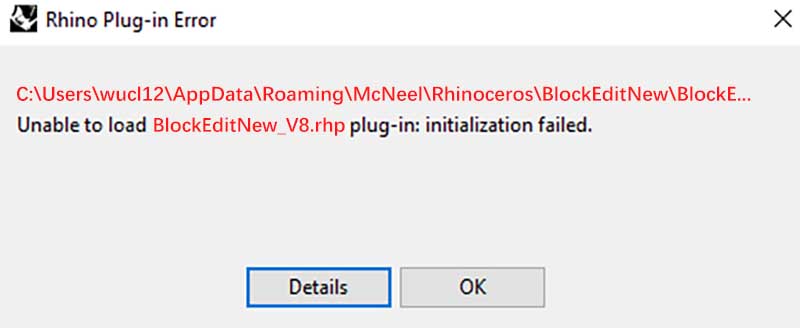 你可以将载入路径的BlockEditNew_V8.rhp,直接替换成zip包内的BlockEditNew.rhp,就可以解决这个问题。
下面时两个解决方案: You can replace BlockEditNew_V8.rhp in the load path with BlockEditNew.rhp from the zip package to resolve this issue.
Here are two solutions:
([你的用户文件夹]\ AppData\ Roaming\ McNeel\ Rhinoceros\ BlockEditNew\ BlockEditNew_V8.rhp) After closing Rhino, rename BlockEditNew.rhp to BlockEditNew_V8.rhp and replace the file in the load path
([YourUserFolder]\ AppData\ Roaming\ McNeel\ Rhinoceros\ BlockEditNew\ BlockEditNew_V8.rhp)
插件功能 Features
编辑的时 Rhino闪退 / 编辑过程中保存并退出Rhino
打后Rhino显示还在编辑中的状态怎么恢复
如何找回备份文件
Rhino Crashes While Editing / Saving and Exiting Rhino While Editing
How to Recover Normal when open a Rhino and still in the Editing State
Retrieve Backup Files.
1. 对于 Block 1. For Blocks
如果是Block,编辑的过程中,会把原本的Block用特殊方式隐藏(Space = None)并且原地炸开,内部物体复制出来方便编辑。Block外的物体会被隐藏/锁定。保存时,会将复制物体写入原始的Block,并取消隐藏。之后删除正在编辑的复制物体。 If it's a Block, during the editing process, the original Block is hidden (Space = None) and exploded in place, with its internal objects duplicated for easier editing. Objects outside the Block are hidden/locked. Upon saving, the duplicated objects are written back into the original Block and unhidden. Then, the duplicated objects being edited are deleted.
如果遇到闪退,炸开的信息丢失,意味着复制物体无法被重新保存到Block中。请删除复制物体。使用ShowAllGhost命令,将原本隐藏的Block显示出来(Space = ModelSpace)。原始Block并不会被删除。如果保持隐藏,会占用Rhino储存空间。 If a crash occurs and the exploded information is lost, it means the duplicated objects cannot be saved back into the Block. Please delete the duplicated objects. Use the ShowAllGhost command to display the originally hidden Block (Space = ModelSpace). The original Block is not deleted. If kept hidden, it will occupy Rhino's storage space.
对于外部物体,可能是锁定状态,使用Unlock命令解锁,或者是隐藏状态,使用Show命令取消隐藏。 For external objects, they might be in a locked state, use the Unlock command to unlock them, or if hidden, use the Show command to unhide them.
2. 对于 Group 2. For Groups
如果是Group,编辑过程中同样会把原本的Group内容(多个物体)用特殊方式隐藏(Space = None)并且复制一份,方便编辑。Group外的物体同样会被隐藏/锁定。保存时,会将复制物体写入原始的Group,并取消隐藏。之后删除正在编辑的复制物体。 If it's a Group, during the editing process, the original Group contents (multiple objects) are hidden (Space = None) and duplicated for easier editing. Objects outside the Group are also hidden/locked. Upon saving, the duplicated objects are written back into the original Group and unhidden. Then, the duplicated objects being edited are deleted.
如果遇到闪退,重新打开Rhino后隐藏记录消失,同样请删除复制的物体,并使用ShowAllGhost命令,将原本隐藏的备份物体显示出来(Space = ModelSpace)。 If a crash occurs and the hidden records disappear after reopening Rhino, please delete the duplicated objects and use the ShowAllGhost command to display the originally hidden backup objects (Space = ModelSpace).
对于外部物体,可能是锁定状态,使用Unlock命令解锁,或者是隐藏状态,使用Show命令取消隐藏。 For external objects, they might be in a locked state, use the Unlock command to unlock them, or if hidden, use the Show command to unhide them.
3. Group如果关闭备份功能 3. Disabling Backup Function for Groups
由于Group编辑时,备份功能会造成运行速度减慢,在自定义设置中可以进行关闭。如果你关闭了Group的备份功能,就不会有备份物体。那么闪退后,无法恢复打开前的Group内的物体。对于外部物体,一样可以使用Unlock或者Show命令恢复。 Since the backup function during Group editing can slow down the operation speed, it can be disabled in the custom settings. If you disable the backup function for Groups, there will be no backup objects. After a crash, the objects inside the Group before opening cannot be recovered. For external objects, you can still use the Unlock or Show command to restore them.